Translations
Display Builder provides the ability to translate any display using the symmetric approach:
- any change on a translatable text will be specific to the display translation
- any other change (layout tree, settings...) will be shared between all translations
A Switching Language is available as a Button island:

A dropdown button showing the current language code (e.g. EN), listing the other available languages by their native name. It is invisible if only one language is available.
With Page Layout, Entity Display, Views and Pattern presets
You need both content_translation and config_translation modules, and at
least a second language added to the website.
When we store the published display to a configuration, most of the translation process is automated:
- all website languages are always available in the language switcher
- the Config Entity translation is automatically created at the first "Publish"
🚧 2026-08-31: This automation is unusual but needed for Entity View Displays because they don't have their own Config Translation UI pages in Core (see #2546212).
With Entity Display Overrides
You need only content_translationmodule, and at least a second language added
to the website.
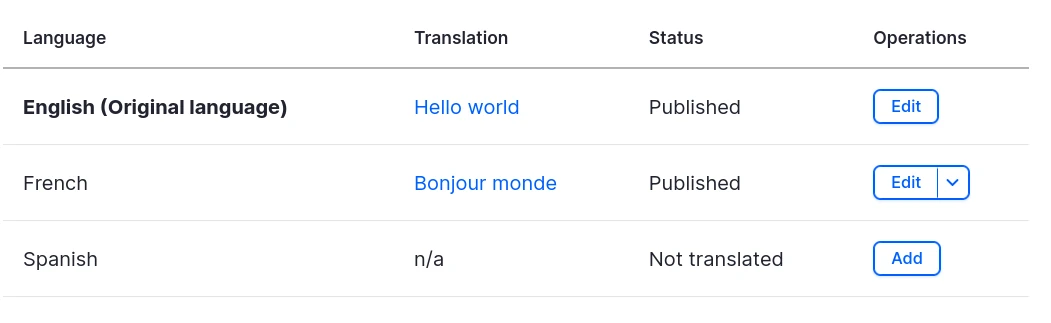
This one is not automated only the translations already available for the content are listed in the language switcher.
So, to make a display override translatable, both the field...
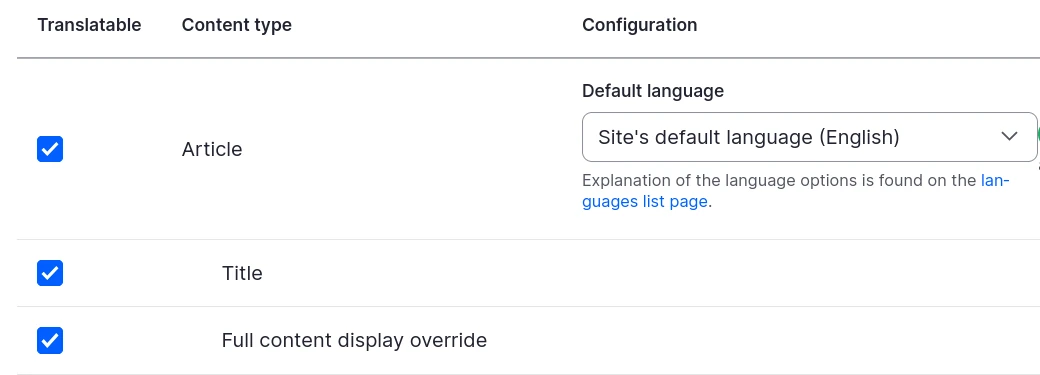
.. and the content must be translatable:
Under the hood
The translatable values are identified in each source plugins, using the label
or text types in Config Schema API, or any schema entry flagged
translatable: true: