How displays nest
A single page is assembled from more than one editable thing. Each one is stored somewhere else and each one is edited in its own builder. When something on the page looks wrong, the first question is not how do I change it but which of these owns it, and this page answers that.
The four levels
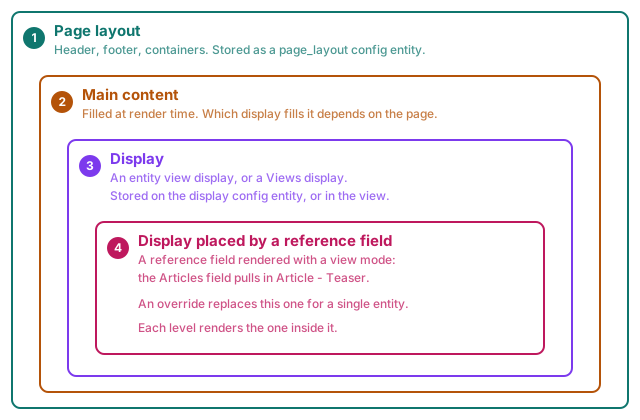
- Page layout owns the frame: header, footer, containers, and the slot where the page's main content goes.
- Main content is filled at render time by an entity view display or a Views display. Which one depends on the page being visited.
- A display can itself place another display, by rendering a reference field with a view mode. A landing page's Articles field pulls in Article - Teaser.
- An override can replace step 3 for one entity only.
Three levels is normal. Four is reachable.
A page layout places the page's main content. What fills it is a display: an entity's view display, or a Views display. A display can itself place another display, by rendering a reference field with a view mode.
The vocabulary
Used in the interface, in these docs and in the Instances panel, always the same way:
| Word | What it means |
|---|---|
| page layout | The page frame, bound to routes by conditions |
| display | An entity view display, or a Views display |
| override | A display replaced for one entity only |
| renders | The relation from a parent level to the level inside it |
One verb for that relation: a display renders another display. Not "embeds", not "contains", not "uses".
Nesting is Drupal's model, not this module's
Layout Builder has the identical chain, and so does a plain site with template overrides: page template, node template, field template, referenced node template. What changed is not the depth, it is the expectation. Once you can click and edit one level directly, the levels you cannot click become frustrating rather than invisible. The problem was made visible, not created.
And the depth buys something. A teaser edited once appears in fifty places. A page builder without this would have you copy it fifty times. Reuse is the payoff, navigation is the price.
How to move between levels
Build one display at a time. Use Preview to see how they assemble on a real page.
Four things do the navigating:
- The Instances panel, in the sidebar. Every display you can travel to, grouped by kind, with the current one marked. Displays that are not built with Display Builder yet are listed too, behind Not using Display Builder, because the chain you are chasing usually runs through one. They are hidden by default: a real site has several times more of them than built ones. Turn the box on and they appear, their name plain rather than a link, with a Build action that takes you to Manage display to enable Display Builder there.
- The Config panel, when you select a node that renders another display. It names the display and offers a link to it.
- Preview, which shows a display inside the page wrapper the site would really give it, so an entity or Views display previews with the real page around it.
- The Display dropdown, in the top bar of a front-end page when the Drupal Navigation module is enabled. It lists the displays built with Display Builder that render the current page, each with a link to its builder: the page layout (Pages matching its conditions), the entity view display (Every Article content) or its override (Only this content), and the Views display (This listing). On content that can be overridden but is not yet, Customize this content starts an override.
Known gap
A render result is decided by inspecting the entity's canonical route, so it misses the case where a View has taken over that route and still renders the entity inside it.
Taxonomy terms hit this by default: core's "Taxonomy term" view owns
/taxonomy/term/{term} and renders the term's full display in a header, but
the route itself no longer says so.
Preview shows that display bare instead of wrapped.
Two other entity types get the right answer from the same route check, but for reasons specific enough to each that they are worth knowing about rather than assuming they follow the general rule:
- Comment. Its canonical link exists but the route is a hand-written
redirect to the node it belongs to, so it never gets
_entity_viewand always previews bare - correct, but only because a comment is a strange exception among content entities, not because the rule was built with it in mind. - Media. Its canonical route only carries
_entity_viewwhen the 'Standalone media URL' setting is enabled for that media type; otherwise canonical points at the edit form instead. The chrome decision for media therefore depends entirely on a per-bundle setting this module does not otherwise look at.
What a placeholder in the builder means
Some things on a page only exist while a real request is being served, so no builder can show them. They appear as hatched placeholder boxes in both the Canvas and the Preview, named after their job:
- Main content, in a page layout. Which display fills it depends on the page being visited, so it has no fixed content anywhere in the builder, Preview included.
- The blocks named after their admin label, such as Messages, Tabs, Primary admin actions, Breadcrumbs and Help. These answer "where am I and what just happened", which has no answer in a builder.
A placeholder is a real node: it can be selected, moved and deleted like anything else. That is the point of showing one, rather than letting an element that renders to nothing become invisible and unreachable.
Editing another level in place is not supported
Clicking a teaser inside a page layout and editing it there is deliberately not possible. It would mean nested builder state, saving into a different config entity, a second permission model and a second undo stack.
Navigate to the level, edit it there, come back.
Do not add page-level containers inside a display
A page layout owns the page frame: containers, grids, header and footer. A display starts inside that frame, so it should not add page-level containers of its own.
The most common cause of "why is there so much padding" is a display wrapping itself in a container the page layout already provides. You can see it today: Highlight outlines containers, and Scaffold renders layout components for real, so a doubled container is visible without any extra tooling.