Extend Display Builder with island plugins
The general idea of an “Islands” architecture is deceptively simple: render HTML pages on the server, and inject placeholders or slots around highly dynamic regions […] that can then be “hydrated” on the client into small self-contained widgets, reusing their server-rendered initial HTML.
Display Builder extensively uses HTMX's out-of-band swapping to allow an event triggered from an island to also update other islands.
There are 5 type of islands:
Viewpanels: They are displayed tabbed in the center of the toolbar, or as buttons in the start of the toolbarButtons: they are displayed as buttons in the end of the toolbarLibrarypanels: They are displayed tabbed into the Library View panelMenuitems: they are displayed in the contextual menu triggered with right-clickContextualpanels: They are displayed tabbed into the contextual sidebar
Visual positioning:
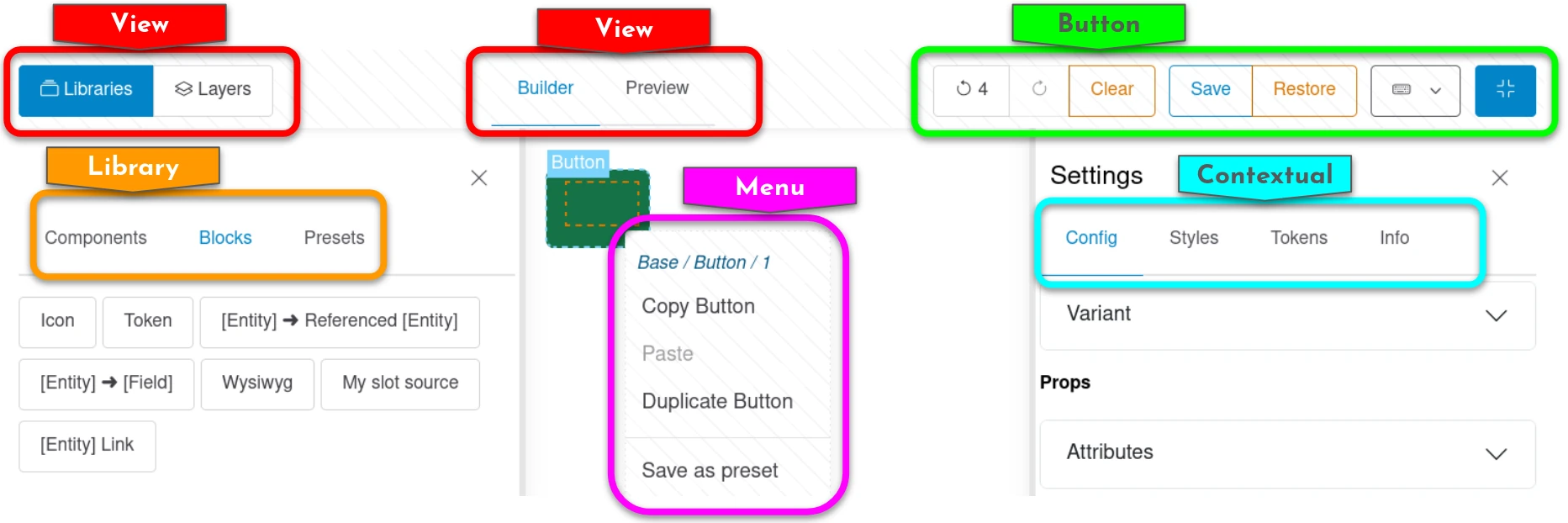
Interface
Notable methods:
IslandInterface::build(): Build the renderable content of the island from state data. This renderable can be annotated byHtmxEventsto trigger HTTP requests- Everything from
IslandEventSubscriberInterface: each method is an HTMX event managed byApiController. Islands receive callbacks for every state-changing operation:
| Method | Triggered when |
|---|---|
onAttachToRoot() |
A node is added at root level |
onAttachToSlot() |
A node is added into a component slot |
onMove() |
An existing node is moved |
onUpdate() |
A node's source configuration is updated |
onDelete() |
A node is removed |
onActive() |
A node becomes the focused node |
onHistoryChange() |
The history pointer changes (undo / redo) |
onPresetSave() |
A node is saved as a reusable preset |
There are similar methods for ApiPublishingController, which are related to action managed by DisplayBuildable plugins:
| Method | Triggered when |
|---|---|
onPublish() |
The builder state is published to the permanent storage (config or content entity) |
onRestore() |
The builder is restored to its last published state |
onRevert() |
An entity view override is reverted to the base display config |
The default base class (IslandPluginBase) returns an empty array for all events. Use IslandReloadEventsTrait if your island needs to do a full re-render on history/restore/revert changes.
- PluginFormInterface::buildConfigurationForm(): to make the island plugin configurable in the Display Builder profile (config entity)
HTMX behavior will change according to IslandInterface::build() return value:
null: the island is not alteredempty: the island is emptied
Attributes
id: Plugin IDlabel: The human-readable name of the plugin.description: A brief description of the plugin.type: The island type from enumeration.icon: Icon for this island. Used for View panels.
Example:
namespace Drupal\display_builder\Plugin\display_builder\Island;

use Drupal\Core\StringTranslation\TranslatableMarkup;
use Drupal\display_builder\Attribute\Island;
use Drupal\display_builder\IslandPluginBase;
use Drupal\display_builder\IslandType;

#[Island(
  id: 'block_library',
  label: new TranslatableMarkup('Blocks library'),
  description: new TranslatableMarkup('List of available Drupal blocks to use.'),
  type: IslandType::Library,
)]
class BlockLibraryPanel extends IslandPluginBase {
}
Keyboard support
We provide a small utility to map buttons to keyboard shortcuts to ease actions in the Display Builder.
If your Island provide a button you should use our method \Drupal\display_builder\RenderableBuilderTrait::buildButton() to generate your button.
This method allow a keyboard mapping as parameter. Check the class for more info.
If your island is of type IslandType::View, implement the keyboardShortcuts() method.
Note: There is no control on duplicate, please ensure your shortcut is not already used.